

The Skills article is about making Hermes better every time you use it. This one is about making Hermes useful even when you’re not at your keyboard.
Cron jobs let you schedule tasks to run automatically on a timer. Set them up once and they fire at the appointed time, run their prompt, and deliver the result wherever you want it. A daily briefing lands in your chat at 7 AM. A weekly report posts to your team Slack channel every Friday afternoon. A blog post draft check runs every Monday morning and nudges you if nothing has been published in a while.
No manual triggers. No remembering to run anything. Just automation that works.
What You Can Schedule
Pretty much anything you can ask Hermes to do in a single prompt. Here are some real examples people actually use, including myself. The first two are actual Cron Jobs I have set up for myself each day or once per week.
Daily check-ins. Every morning, Hermes asks you a short set of questions about your plans for the day. It keeps you focused and builds a log you can look back on.
Weekly report drafts. On Friday afternoon, Hermes looks at your week notes and drafts a summary report. It posts it to your team channel or emails it to your manager.
Content monitoring. A job checks an RSS feed or a website every morning and tells you if something new was published. You never miss a post from your favorite blogs.
Reminders with context. Not just “remember to do X” but full prompts like “It is Wednesday morning. Check the team schedule, see if anyone is out today, and remind me of any coverage gaps.”
Status page pings. A lightweight job hits a URL every five minutes and alerts you if it gets a non-200 response. Simple, effective uptime monitoring.
How To Create One
The syntax could not be simpler. From inside any Hermes session, just tell it what you want and when:
“Create a cron job that checks my RSS feed every morning at 8 AM and tells me if there are new posts.”
Hermes handles the rest. It picks the right schedule format, writes the prompt, and sets up delivery to your current chat.
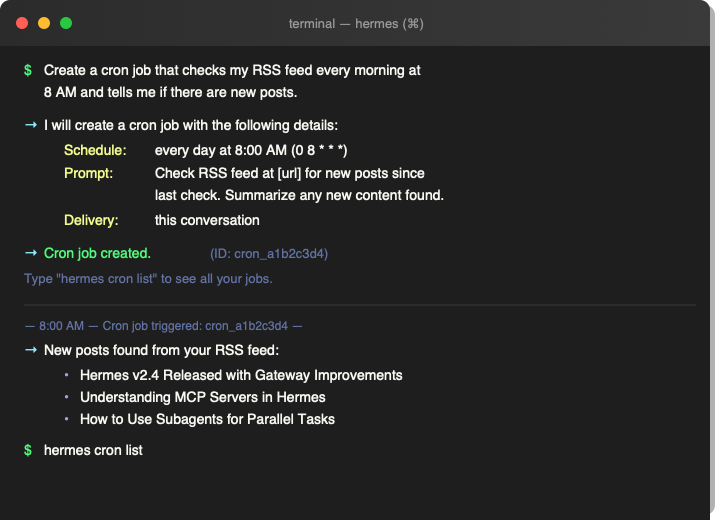
You can also create one directly with the cron job tool by specifying a schedule and a prompt. Schedules use human-friendly phrases like “every 2 hours,” “every Monday 9am,” or “30 minutes.” Traditional cron syntax like “0 9 * * 1-5” works too if you are used to it.
Where Results Go
By default, results are delivered right back to the conversation where you created the job. That is the easiest way to start because you see the output immediately and can tweak the prompt if needed.
For more advanced setups, you can route results to a different platform entirely. A status check can ping your team Slack channel. A daily briefing can go to Telegram. A weekly report can be emailed. The delivery system supports Telegram, Discord, Slack, WhatsApp, email, SMS, and more.
Making Jobs Smarter
Cron jobs can chain together. One job collects data, and another job processes what the first one found. This lets you build multi-step automations without any external scripting.
Jobs can also load skills, so they benefit from everything you’ve taught Hermes. A weekly report job can load your report writing skill and produce output that follows your established format. Skills and cron jobs work together naturally.
A Few Things To Know
Jobs have a three minute execution limit. That is plenty for research, drafting, checking feeds, or running prompts. For anything longer, use the delegation system instead.
You can pause, resume, and remove jobs at any time. Creating a job is not a commitment. If a daily briefing turns out to be more noise than signal, you can silence it with one command.
New jobs start automatically after you create them. you don’t need to restart Hermes or reload anything.
Start Small
Pick one thing you currently do manually every day or every week and automate it. A morning briefing. A daily log prompt. A weekly cleanup reminder.
Let it run for a few days. See how it feels to have Hermes show up at the same time each day with something useful. Then add another.
Before long, you will have a small fleet of automated assistants handling the repetitive parts of your day, and you can focus on the work that actually needs your attention.
I’ve only been using Hermes for close to two weeks now and already have eight Cron Jobs. I have three that are early morning or first thing in the morning if you will. Then I have three that are work specific for things that I’ve learned to automate since diving into AI over the past few weeks.
Skills taught you how to capture your workflows. Cron jobs put them on autopilot. The next article covers the third piece of the puzzle: memory. That is where Hermes learns who you are and remembers your preferences across every session.
What You Learned From The Skills Article
The previous article in this series covered how Hermes captures your workflows as reusable skills. Every time you solve a problem, you can save the solution and Hermes loads it automatically in future sessions. If you missed that one, How Hermes Skills Turn Your AI Agent Into A Self-Improving Assistant. Skills handle the how. Cron jobs handle the when.
Part Of The Hermes Agent Series
This article is one piece of a bigger story. Read the whole series in order and get the complete picture of what Hermes Agent can do.