

Every conversation with a typical AI assistant starts the same way. You reintroduce yourself, your project, your preferences. You explain that you prefer tabs over spaces. You remind it that your deploy process uses Docker, not direct FTP. You repeat the same context over and over.
Hermes Agent fixes this with persistent memory.
Memory is the third piece of the trilogy. Skills capture how to do things. Cron jobs run those things on a schedule. Memory makes sure Hermes never forgets who you are while doing them.
What Memory Actually Does
Memory stores facts about you that carry across every session. Your name, your role, your preferences, your recurring projects, the quirks of your environment, the conventions your team follows. Once stored, these facts load automatically into the system prompt of every future conversation.
This is not a conversation log. It is not a raw transcript dump. It is a curated collection of the things that matter for Hermes to work well for you. A log tells Hermes what happened. Memory tells Hermes who you are.
What Belongs In Memory
The best entries are the things you find yourself repeating. If you have corrected Hermes on the same point more than once, that belongs in memory. If a project has a specific build command or testing convention, that belongs in memory.
Here are some examples that people actually store:
Personal preferences. “User prefers concise responses with bullet points.”
Project conventions. “This project uses pytest with xdist. Always run tests before declaring a change done.”
Environment details. “The database runs on localhost:5432 with a .env file in the project root. Node version is pinned to 20 LTS.”
Workflow rules. “When reviewing PRs, always check for security vulnerabilities first. Use conventional commits format.”
Each entry is a small, durable fact. Individually they save a few seconds. Collectively they save hours and prevent a constant stream of corrections.
How To Add Memory
The simplest way is to just tell Hermes. Next time it does something that needs correcting, or the next time you realize it should know something about you, say:
“Remember that I prefer pytest over unittest.”
That is it. Hermes saves it, and from then on every session knows about your testing preference.
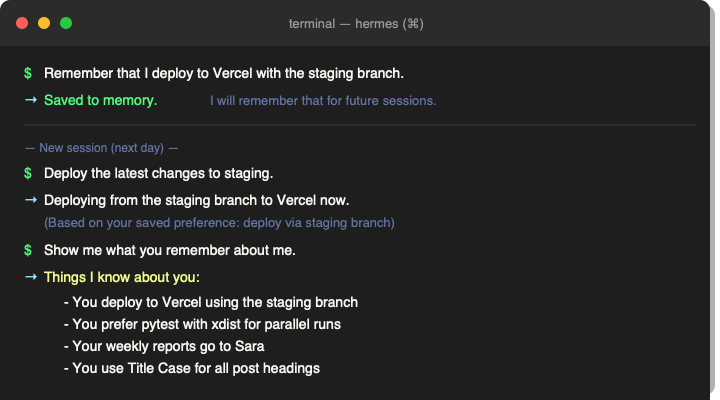
You can also add entries directly through the memory tool if you prefer managing things yourself. And you can view everything Hermes currently remembers at any time to review or remove stale entries.
Why This Matters More Than You Think
Memory is what makes Hermes feel like a long-term collaborator rather than a fresh hire every morning. When you sit down to work, Hermes already knows your stack, your preferences, your project conventions, and your pet peeves. It does not need to rediscover them.
This compounds in the same way skills do. The more you use Hermes, the richer its memory of you becomes. Conversations flow faster. Corrections are rarer. Suggestions are more relevant.
The gap between a fresh session and a session with six weeks of memory is startling once you experience it.
Memory And Skills Work Together
Skills store procedures. Memory stores facts. They complement each other.
A skill might contain the exact steps to deploy your app. Memory would store that you deploy to Vercel, not Netlify. The skill tells Hermes the procedure. Memory tells Hermes which procedure to reach for.
A skill might contain the format for your weekly reports. Memory would store that those reports go to Sara and should be concise and manager-ready. The skill handles the structure. Memory handles the context.
Try It
Next time Hermes gets something wrong because it did not know a detail about you, save that detail. Next time you find yourself repeating the same instruction, save it. Memory fills up fast when you get in the habit, and every entry makes the next session better.
Start with one thing: “Remember that I use VS Code, not Vim.” Then add another tomorrow. Within a week, Hermes will know more about your workflow than most of your coworkers do.
The previous article showed you how to put tasks on autopilot with cron jobs. The next one ties everything together into a complete picture of how skills, memory, and automation work as one system.
The previous article in this series covered cron jobs, which let you schedule tasks to run automatically on a timer. Skills handle the procedures. Cron jobs handle the schedule. Memory handles the context. Together, they make Hermes smarter, more reliable, and more useful the longer you use it.
Part Of The Hermes Agent Series
This article is one piece of a bigger story. Read the whole series in order and get the complete picture of what Hermes Agent can do.