

Every AI agent starts as a blank slate. You spend the first part of every conversation rebuilding context it already had last time. “I use pytest, not unittest.” “The deploy command is npm run deploy:staging, not npm run build.” “Always check for security vulnerabilities before approving a PR.”
Hermes Agent fixes that with skills. They are reusable procedures that your agent saves, remembers, and loads automatically into future sessions. The more you use them, the smarter your agent gets about your specific work.
What A Skill Is
A skill is a markdown file with a complete recipe for handling a specific task. It includes step by step instructions, exact commands and flags, environment details, common failure points, and verification steps to confirm everything worked. Think of it as a well documented procedure that your agent can follow without any hand holding.
Skills live in ~/.hermes/skills/. When you start a session, Hermes scans that folder and loads the relevant skills into context. You don’t have to remember what you saved or manually load anything. Hermes figures out what is relevant based on what you are working on.
How To Create A Skill
The simplest way to create a skill is to ask. After Hermes helps you solve something non-trivial, say:
“Save what you just did as a skill called fix-postgres-migration”
Hermes extracts the essential steps from your session, strips out the session specific details, and writes a clean reusable file. The command names, the flags that matter, the order of operations, the gotchas that tripped you up. All captured automatically.
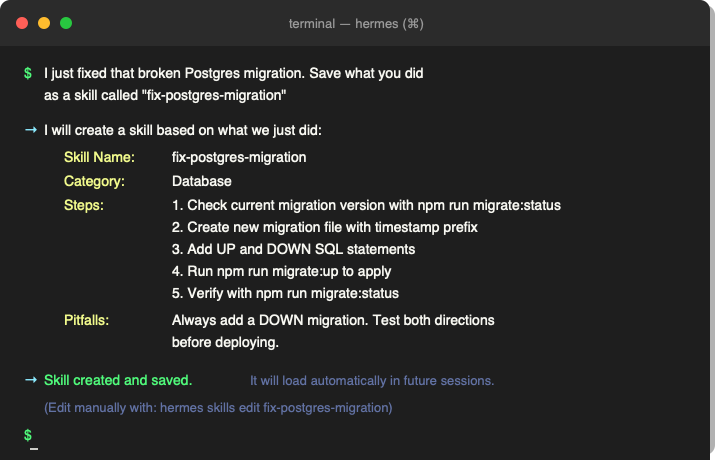
A Real Example
Imagine you spent 20 minutes figuring out how to set up a cron job that posts a daily standup message to your team Slack channel. You worked through the schedule syntax, the webhook URL format, the message template. It took trial and error.
Without skills, that knowledge is gone when you close the session. Next month when you need to set up a reminder for a different channel, you start from scratch.
With a skill, you ask Hermes to save it. Next time, Hermes loads that skill and adapts it for the new channel. What took 20 minutes the first time takes two minutes the second time.
How Skills Compound Over Time
Skills don’t just pile up. They build on each other.
The deployment skill references the environment setup skill. The debugging skill references the testing skill. A skill about cron jobs might reference a skill about Slack integrations. Over time, Hermes starts connecting them automatically. It sees you working on a database issue and loads your migration and rollback skills without being asked.
Your skill library becomes a personal knowledge base that grows with every problem you solve.
Skills Vs. Memory
Skills and memory serve different purposes. Skills store procedures for doing things. Memory stores facts about you and your preferences. A skill knows how to deploy your app. Memory knows you deploy to Vercel, not Netlify. They work together. Memory provides the context, skills provide the instructions.
Managing Your Library
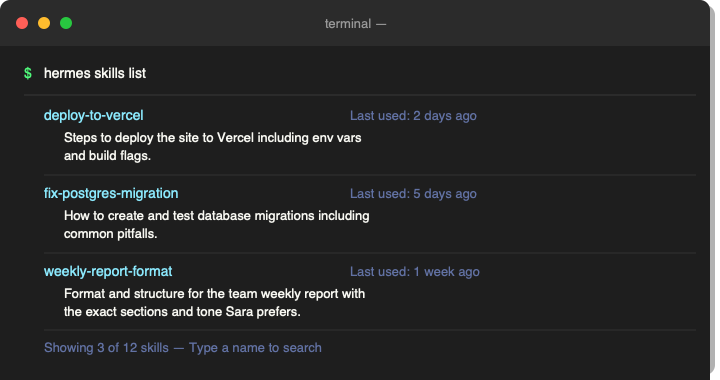
The curator system tracks which skills you actually use. It flags stale ones that haven’t been referenced in a while and archives what you have outgrown. Your library stays lean without manual cleanup. You can also pin important skills so they never get archived. Run hermes skills list anytime to see what you have saved.
Start With One
Next time Hermes helps you untangle something that took a few tries, ask it to save that as a skill. Pick a clear name. Let it build up from there.
After a week, you will notice you correct Hermes less. It suggests the right approach more often. Tasks that used to take several exchanges resolve in one or two.
That is the loop. You teach Hermes once. It remembers forever.
If you haven’t run the interview prompt yet, that’s where this all starts. It takes about 10 minutes and gives Hermes the context it needs to make skills like these actually useful for your specific work. Why The First Thing You Should Do With Hermes Is Let It Interview You.
Part Of The Hermes Agent Series
This article is one piece of a bigger story. Read the whole series in order and get the complete picture of what Hermes Agent can do.