

You have spent weeks building up your Hermes setup. Skills that capture your workflows. Memory entries that store your preferences. Cron jobs that automate your day. Custom config tweaks that make everything feel right. Losing all of that to a corrupted file or a bad update would hurt.
Hermes includes five features that protect your setup at different levels. Some are automatic. Some you run on demand. Together they give you a safety net that covers everything from accidental file changes to full system recovery.
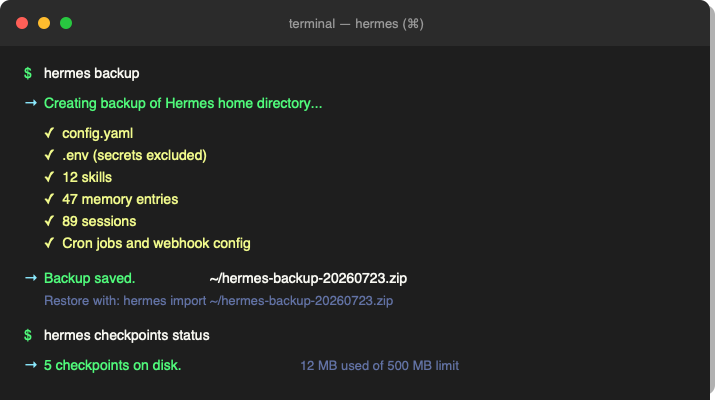
Hermes Backup: The Full Safety Net
The hermes backup command creates a zip file of your entire Hermes home directory. Every skill, every memory entry, every session transcript, every cron job definition, every config setting. Everything except your .env secrets, which are intentionally excluded for security.
Running it takes about two seconds:
hermes backup
The zip lands in your current directory with a filename that includes the date. You can move it anywhere. Stick it in a cloud drive, an external disk, or a backup service. If you ever need to restore, hermes import reads the zip and puts everything back where it belongs.
This is the command to run before anything risky. Before a major update. Before experimenting with config changes. Before cleaning out old sessions. One command, instant peace of mind.
Hermes Import: Restoring From Backup
Restoring is just as simple as backing up. Point Hermes at your zip file and it unpacks everything back into place:
hermes import ~/hermes-backup-20260723.zip
It will overwrite existing files with the versions from your backup. This is the command you want when moving to a new machine, recovering from a corrupted config, or reversing a change that broke something.
If you are migrating to a new computer, take a backup on the old machine, transfer the zip, and run import on the new one. All your skills, memory, and sessions come with you.
Hermes Checkpoints: Automatic Rollback Safety
Checkpoints are like a safety net for your filesystem. When enabled, Hermes automatically takes a snapshot of your project files before it makes destructive changes. If something goes wrong, you can step back with /rollback during a session or manage checkpoints directly:
hermes checkpoints
This shows you how many checkpoints exist, how much disk space they use, and lets you prune old ones. Think of it as a safety net for your work in progress. Where hermes backup protects your Hermes setup itself, checkpoints protect the files Hermes touches while helping you.
Hermes Migrate: Safe Config Updates
When models get retired or settings change, hermes migrate updates your config.yaml to match. Before it changes anything, it takes a timestamped backup of your original config. If the migration does not work as expected, your old config is sitting right there waiting to be restored.
hermes migrate xai --apply
It defaults to a dry run, showing you what would change without actually writing anything. When you are ready, pass --apply to commit the changes. Use --no-backup only if you already have a fresh backup and do not want another one.
Hermes Update: Backup Before Upgrading
Updating Hermes itself is usually smooth, but things can go wrong. Dependencies change. APIs shift. Features get deprecated. The --backup flag on the update command takes a snapshot of your Hermes home directory right before pulling the latest code:
hermes update --backup
If the update breaks something, you have a pre-update backup ready to restore with hermes import. This is the belt and suspenders approach. The update might work perfectly 99 percent of the time, but the one time it does not, you will be glad you had that backup.
A Practical Backup Strategy
You do not need to run all five of these constantly. Here is a simple routine that covers everything:
Weekly: Run hermes backup and store the zip somewhere safe. This is your safety net for your entire Hermes setup.
Before risky changes: Run hermes backup again. It takes two seconds and costs nothing.
During sessions: Let checkpoints handle the automatic safety net. If something goes wrong, use /rollback to undo it.
When updating Hermes: Use hermes update --backup. It backs up before it upgrades.
When migrating configs: Use hermes migrate with the default dry run first, then --apply when you are sure.
That is it. Five minutes of habit per week saves you from losing weeks of accumulated setup. Backup early, backup often.
Part Of The Hermes Agent Series
This article is one piece of a bigger story. Read the whole series in order and get the complete picture of what Hermes Agent can do.