

The Saturday Afternoon Ritual I Do Not Miss
I used to spend my Saturday afternoons doing something I hated. I would sit down, open a blank document, and try to remember everything that happened with my team over the past five days. What went well. What went wrong. Who needed training. What issues were still open. It was a scramble. I always forgot something.
The worst part was that the report went to Sara, my manager. She did not need dramatic prose or creative formatting. She needed a clear, honest picture of the week. Wins. Issues. Training completed. I wanted to give her that, but I was relying on my memory from five days earlier, and memory is terrible at that job.
So I built something better. Here is exactly how it works.
I stopped relying on my Friday brain to remember what Monday me knew. Hermes remembers everything. That is the whole trick.SeerOfSouls
What The Old Way Looked Like
My week with the team involves a lot of moving parts. New hires coming through training. Performance conversations. Coaching moments. Process wins. System issues. By Friday, I could give you broad strokes, but the details were gone. I would write a report that hit the high points and missed the specifics that actually mattered to Sara.
It was not laziness. It was just the limit of human recall. I knew there was a better way, but I did not want to turn my workflow into a full time administrative job. I needed something that collected information as it happened, without me having to stop and think about it.
The Simple Idea
The solution turned out to be embarrassingly simple. Instead of trying to remember everything at the end of the week, I save notes during the week. The difference is that I do not open a separate app or document to do it. I just tell Hermes to save something while I am already working.
It works like this. During a conversation with Hermes, if something report worthy comes up, I say something like “Save this to my weekly notes.” Hermes appends it to a local markdown file. That is the entire capture process. It takes about three seconds and I do not leave my chat.
The key is that the notes file is always there, always open, always ready. You do not open a separate tool. You do not switch contexts. You just say the words and keep moving.
The file grows through the week. Monday might add a win about a new hire completing their first week. Tuesday might add an issue about a recurring system outage. Wednesday might add a training note about a process improvement. By Friday, the file has a complete picture of the week, captured in the moment instead of reconstructed from memory.
The Saturday Pipeline
Saturday at 2 PM Eastern, a cron job fires. That is the trigger. The job loads a specific skill that knows how to handle weekly reports, then reads the notes file and formats everything into a warm report for Sara.
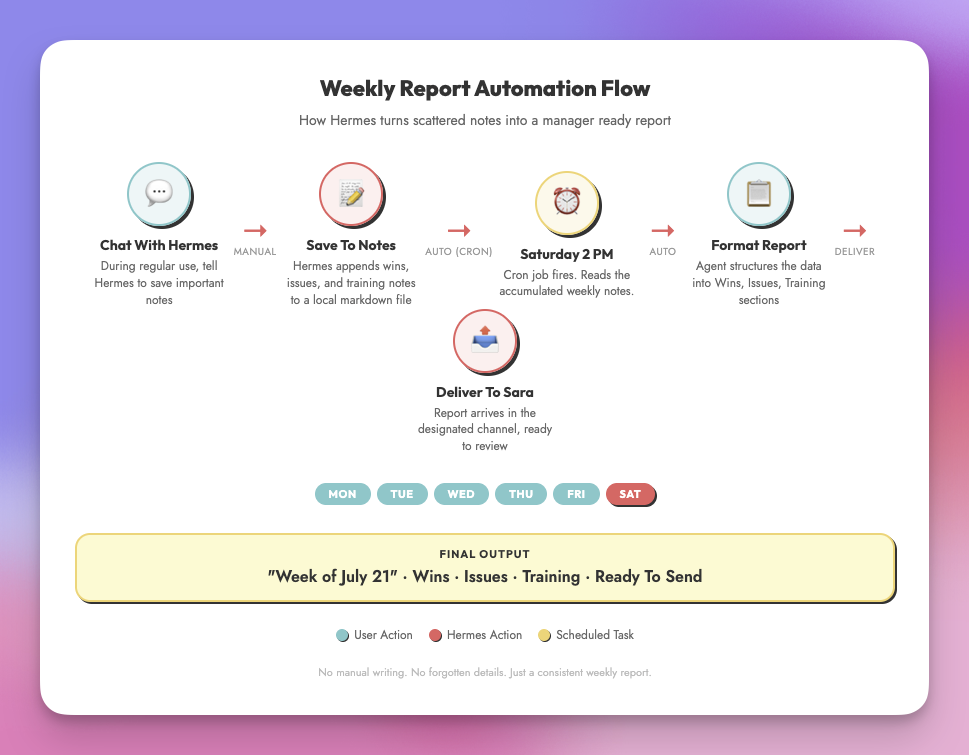
Here is the actual cron prompt that runs every Saturday:
Read ~/.hermes/data/weekly-notes.md. Format the contents into a warm weekly report for the boss. Use a “Week of” heading at the top. Structure the report with three sections: Wins, Issues, and Training. Keep the wording concise and manager ready. No fluff, no commentary, just the facts presented clearly. After the report is delivered, clear the file so it is ready for next week.
The prompt is not complicated. It does not need to be. The skill handles the formatting rules, and the cron job handles the schedule. Together, they replace a task that used to take me 20 to 30 minutes every Saturday.
The report writes itself. I do not touch it. I do not review it before it sends. I checked the first few to make sure the quality was there, and after that I let it run. That is the level of trust you can build with a well designed automation.
What A Report Actually Looks Like
The format is plain and structured. It starts with “Week of” and the current date. Then three sections:
- Wins — New hire milestones, positive feedback, process improvements, team achievements
- Issues — System outages, staffing gaps, escalations, unresolved problems
- Training — Completed training sessions, certifications, coaching moments, skill development
Each item is a short, factual bullet. No editorializing. No opinions. Just what happened and why it matters. Sara can scan it in thirty seconds and know exactly where things stand.
Write your notes like you are telling a busy person what they need to know. One sentence per item. The who, the what, and the impact. That is all you need. Your future self (and your manager) will thank you.
The Real Results
This has been running for a while now, and the results are boringly consistent. Every Saturday at 2 PM, the report arrives. It is never late. It never forgets something. It never has that rushed Friday afternoon quality where you know the person was just trying to get it done and go home.
I also notice that I save better notes now. Knowing the report will be built from whatever I save makes me more thoughtful during the week. I flag things I might have let slide before, because I know they will become part of the permanent record. The automation changed my behavior, not just my output.
This only works if you actually save notes during the week. If you skip the capture step, the report will be thin. The automation is not magic. It is just a really good assistant that needs raw material to work with.
Setting This Up Yourself
You do not need my exact setup. The pattern is what matters. You need three things:
- A place to save notes. Anywhere will do. A file, a document, a Notion database, a Google Doc. The important thing is that it is easy to write to and easy to read from.
- A trigger. Cron jobs are great for this. Pick a time when you will not be in the middle of something else. Saturday afternoon works well because the week is fresh and the next week has not started yet.
- A prompt that defines the output. Be specific about the format, the audience, and what to include. A vague prompt produces a vague report. A specific prompt produces something you can send without editing.
The setup takes about 30 minutes. The first report might need a tweak or two. By the third week, you will forget you even set it up. That is the goal. A system that works without you thinking about it.
Start Small
You do not need to automate everything at once. Start with one report. One capture habit. One Saturday afternoon that you get back. See how it feels to have a machine handle something that used to live in your head.
You might be surprised how many other weekly tasks can follow the same pattern. I certainly was.
Part Of The Hermes Agent Series
This article is one piece of a bigger story. Read the whole series in order and get the complete picture of what Hermes Agent can do.