

I have been writing about Hermes for a few weeks now, and I realized I have not shown you the thing I actually use it for most. I manage my WordPress site entirely from chat. I draft articles, set categories and tags, write excerpts, add featured images, and make edits after publishing. All without opening the WordPress admin.
Here is exactly how that works and why it has become my favorite way to write.
The Setup
It starts with an Application Password. Every WordPress user can generate one from their profile page. It is a long random string that gives Hermes API access to your site without sharing your main password. You generate it once, paste it into Hermes when asked, and that is it. From then on, Hermes can talk to your site REST API directly.
Drafting An Article
This is what I do most often. I will have an idea for a piece, and instead of opening the WordPress editor and staring at a blank screen, I just tell Hermes what I want to write.
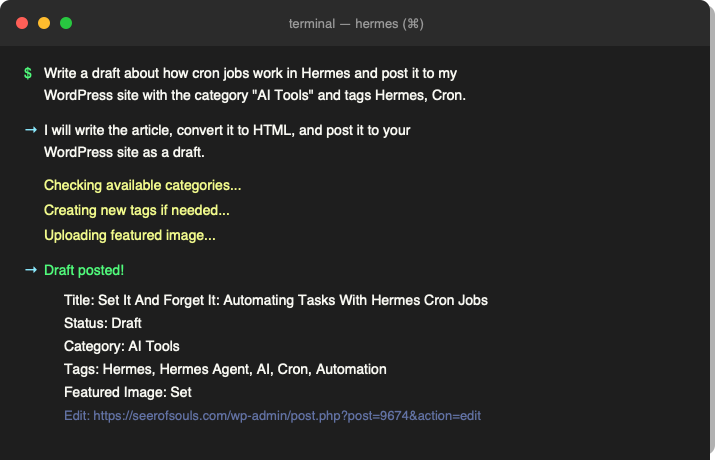
I might say something like, “Write a draft about how cron jobs work in Hermes and post it to my site with the AI Tools category.” Hermes writes the article, converts it to HTML, creates the post, and sets the category. I also ask for a Google excerpt and relevant tags. It handles all of that in one shot.
The time savings are real. Writing and formatting an article in the WordPress editor takes me a good chunk of time. Telling Hermes what I want and having it post a formatted draft with everything in place takes a couple of minutes. I can crank out three or four drafts in the time it used to take me to do one.
After The Draft
Once the draft is up, I can tweak it directly from chat. Add a tag I forgot. Change the excerpt. Swap out the featured image. Push an update to the title. It is all the same pattern: tell Hermes what to change, and it sends the update through the API.
I have also started asking Hermes to check for things I might have missed. “Does this post have enough tags?” “Is the excerpt search-friendly?” “Should I add a category here?” It catches stuff I would normally spot after publishing and have to go back and fix.
Tags And Categories
This was the thing I was most skeptical about before I tried it. I thought managing taxonomy through chat would be clunky. It is not. Hermes checks what tags already exist, creates new ones if needed, and assigns them to the post. It handles categories the same way. I do not have to remember tag IDs or dig through the admin to find what I need.
I have a few preferences saved about how I like things tagged, and Hermes remembers those between sessions. Every time I save a preference, the next post goes a little faster.
Featured Images
The workflow for images is pretty slick too. I ask Hermes to find a relevant image from the web, download it, upload it to my media library, and set it as the featured image. It grabs whatever fits the topic and handles the upload and assignment in one step.
I used to spend way too long hunting for the right featured image, downloading it, uploading it, and setting it. Now I just describe what I want and it happens.
Why This Works For Me
I write better when I am not staring at a CMS. The WordPress admin is fine for publishing and managing content, but it is not where I want to spend my creative energy. Offloading the mechanical parts of posting an article to Hermes lets me focus on the actual writing.
It also means I can draft from anywhere. My phone, my laptop, wherever. Hermes follows me across devices and platforms, so if I have an idea while I am out, I can dictate a draft and have it posted before I forget the details.
Where We Have Been
The previous article in this series rounded up everything covered so far: the interview prompt, skills, cron jobs, and memory. It showed how the four pieces fit together as a three layer stack.
This post covers the complete series: Your Hermes Journey: A Four-Part Series On Getting The Most Out Of Your AI Agent.
What Is Next
This series covered the Foundations. Skills, Memory, Cron Jobs, and a real world workflow. There is plenty more to explore in Hermes. The gateway system lets you use Hermes from Telegram, Discord, Slack, and SMS. Subagent delegation lets you spawn parallel workers for complex tasks. MCP servers let you connect Hermes to external tools and services. More articles on those are coming soon.
Part Of The Hermes Agent Series
This article is one piece of a bigger story. Read the whole series in order and get the complete picture of what Hermes Agent can do.