

If you are new to Hermes, the sheer number of features can feel overwhelming at first. Skills, memory, cron jobs, gateways, MCP servers, subagents. It is a lot. But you do not need to learn all of it at once. The best way to get started is to focus on three core features that build on each other.
This series covered exactly that path. Here is a quick guide to what each article covers and where you should start depending on where you are in your Hermes journey.
Where To Start
If you have not used Hermes yet, or you have only poked around a little, start with the interview prompt. It explains why the best way to begin is not by tweaking config files or reading documentation. It is by running a single prompt that lets Hermes get to know you. The interview asks about your goals, your projects, your technical experience, and your frustrations. It asks one question at a time and adapts based on your answers. By the end, you get a personalized summary, the top five ways Hermes can help you, and a seven day plan.
You can read the full Interview Prompt article here: Why The First Thing You Should Do With Hermes Is Let It Interview You.
Skills
Once you have gone through the interview and started using Hermes day to day, the next step is understanding skills. Skills are reusable procedures that capture how to do specific things. When you solve a tricky problem with Hermes, you can save that solution as a skill. Next time a similar problem comes up, Hermes already knows the approach that worked before.
You can read the full Skills article here: How Hermes Skills Turn Your AI Agent Into A Self-Improving Assistant.
Cron Jobs
After you have built up a few skills and gotten comfortable with how Hermes works, it is time to put things on autopilot. Cron jobs let you schedule tasks to run automatically. Daily check-ins, weekly report drafts, content monitoring, reminders with context, status page pings. You tell Hermes what you want and when you want it, and it handles the rest. Results can show up in your chat, your team Slack channel, or your Telegram DMs.
You can read the full Cron Jobs article here: Set It And Forget It: Automating Tasks With Hermes Cron Jobs.
Memory
The final piece of the puzzle is memory. Skills capture how to do things. Cron jobs run those things on schedule. Memory ensures Hermes never forgets who you are while doing them. Your preferences, your project conventions, your environment details, your pet peeves. Once stored, they load automatically into every future conversation.
You can read the full Memory article here: Never Start From Scratch: How Hermes Persistent Memory Remembers Who You Are.
How They Fit Together
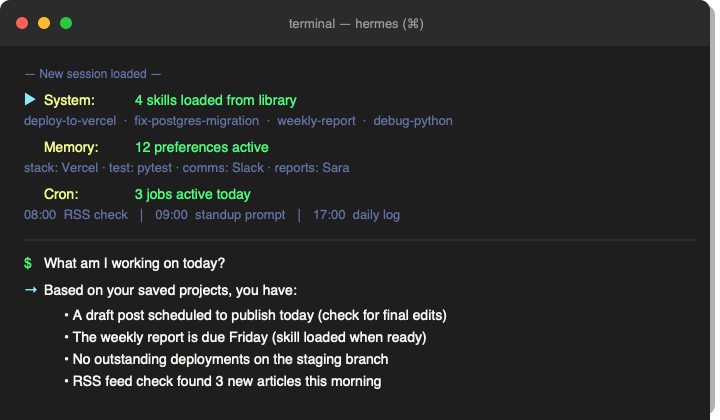
Think of it as a three layer stack. Memory is the foundation. It tells Hermes who you are and how you work. Skills sit on top of that. They tell Hermes how to handle specific tasks using the context it already has about you. Cron jobs sit on top of skills. They run those tasks automatically without you needing to lift a finger. You do not have to tackle all three at once. Start with the interview prompt. Use Hermes for a week or two and save a few skills along the way. Add a cron job when you find yourself doing the same thing at the same time every day. Save things to memory whenever you notice Hermes missing something it should know about you. Each step makes the next one more valuable.
Where We Have Been
The previous article in this series covered persistent memory. That is where Hermes stores facts about you across every session so you never have to repeat yourself. Skills and cron jobs handle the how and the when. Memory handles the who.
What Is Next
The next article in this series takes everything covered here and applies it to a real world use case. It shows exactly how I use Hermes to manage my WordPress site. Drafting articles, setting categories and tags, adding featured images, editing posts after publishing. All from chat. If you want to see what this series looks like in practice, that is the one to read.
Part Of The Hermes Agent Series
This article is one piece of a bigger story. Read the whole series in order and get the complete picture of what Hermes Agent can do.